Student Registration
Policy Authority:
Medgar Evers College follows the enrollment, program adjustment, and withdrawal standards established by The City University of New York (CUNY) and implemented by the College Office of the Registrar. These procedures are aligned with CUNY’s University‑wide Attendance, Enrollment Verification, and Withdrawal policies (effective Fall 2009).
All students register for courses in Schedule Builder during their assigned enrollment appointment times. Assigned enrollment (registration) appointments provide students access to enrollment via Schedule Builder. Students are not required to attend in-person registration. Incoming Freshman, Transfers and Returning students must meet with an academic advisor for onboarding and registration guidance.
Students must ensure they file for financial aid and seek advisement before enrolling in classes.
Financial Aid
Students should seek guidance from a financial aid Advisor.
You can contact the Financial Aid Office by email at finaid@mec.cuny.edu.
For detailed financial aid information, please visit the Medgar Evers College Financial Aid webpage.
Academic Advisement Center
Students should seek guidance from their respective academic advisors or their major/program advisors for registration guidance. Please contact your assigned advisor based on your program or credit standing:
Academic Advising Center – for students with 30 or more credits: acadvisecenter@mec.cuny.edu
Accelerated Study in Associate Programs (ASAP): asap@mec.cuny.edu
Freshman Year Program – for students with 0 to 29 credits: fyp@mec.cuny.edu
SEEK Program: seek@mec.cuny.edu
School of Education: acollins@mec.cuny.edu
CUNYFirst
Your CUNYfirst Student Center is a gateway for managing your academic-related activities. Be sure to check out this 10-minute clip which illustrates how to view your personal details, class schedule, course history and grades, and financial aid summary information as well as how to manage to-do list items, set up payment plans, and make payments, request transcripts, and upload administrative documentation.
Registration in Schedule Builder
Students may search and register for courses, and change their class schedule online via Schedule Builder. Registration may be completed anywhere with reliable internet access and students may register on/after their assigned enrollment appointment.
NOTE: Enrollment Appointments cannot be changed. You must wait until your assigned Date and Time.
- Schedule Builder Student Manual
- How to Add, Drop, and Swap Courses in Schedule Builder (Video Tutorial)
- How to DegreeWorks Plan (Video)
Program Adjustment Period and Census Date
CUNY defines the Program Adjustment Period as the period at the beginning of each academic term during which student enrollment stabilizes. This period is used for enrollment verification, financial aid eligibility, and official reporting.
The Census Date marks the end of the Program Adjustment Period. Enrollment status as of this date becomes the basis for federal reporting, financial aid determination, and institutional records.
Specific Program Adjustment Period and Census Date deadlines are published each term in the official Academic Calendar.
Add, Drop, and Withdrawal Policy
Medgar Evers College (CUNY)
Medgar Evers College provides students with the ability to add, drop, or withdraw from courses in accordance with University policies, published academic deadlines, and established financial control requirements. Students are responsible for understanding how schedule changes may affect academic standing, tuition liability, refunds, and financial aid eligibility.
Add Period
Students may add courses only during the official add period, as published in the College Academic Calendar. Course additions must be completed through CUNYfirst (Schedule Builder) by the stated deadline. Courses may not be added after the add period has ended.
Drop Period
A course drop occurs when a student removes a course during the published drop period. Drops completed within the applicable refund period may result in a partial or full tuition adjustment, depending on the date of the drop and the semester/session. After the drop period ends, students are no longer permitted to drop courses and must instead withdraw.
Dropping a course after the first official day of classes may result in tuition liability. Refund eligibility and percentages are determined by the Office of the Bursar based on the date the course is dropped in CUNYfirst.
Withdrawal from Courses
A withdrawal occurs when a student removes a course after the drop period has ended and within the official withdrawal period.
- Students may officially withdraw from courses without academic penalty through:
- the ninth week of classes in Fall and Spring,
- the third week of the Summer session,
- the first week of the Winter session, as published in the Academic Calendar.
- Courses withdrawn during the withdrawal period receive a grade of W (Official Withdrawal), which does not calculate into the GPA.
- Students who stop attending courses without officially withdrawing are assigned a grade of WU (Unofficial Withdrawal), which does not calculate into the GPA.
All course withdrawals result in 100% tuition liability for the withdrawn course. Fees are non‑refundable. Withdrawal from courses may affect financial aid eligibility and satisfactory academic progress; students are strongly encouraged to consult the Financial Aid Office prior to withdrawing.
Program‑Specific Restrictions
Certain academic programs and course types (including, but not limited to, Nursing) have additional withdrawal restrictions or approval requirements. These program‑specific policies supplement, but do not replace, college‑wide add/drop/withdrawal rules.
Academic Calendar Authority
All add, drop, withdrawal, refund, and grading deadlines are governed by the official Medgar Evers College Academic Calendar, which is the authoritative source for dates and timeframes each term.
-
Nursing Program:
Nursing students are subject to stricter withdrawal rules, including defining some withdrawals as attempts and limiting the total number of withdrawals per course. View Nursing Withdrawal Policy -
Financial Aid Rules:
Withdrawals and unofficial withdrawals (WU) may affect eligibility, satisfactory academic progress, and aid repayment. View Financial Aid Withdrawal Guidance -
Tuition & Refund Rules:
Tuition liability and refunds are governed by the Office of the Bursar and depend on the date of the schedule change. View Bursar Refund Policy
Add / Drop / Withdrawal Impact Matrix
Know before you change your schedule.
| Student Action | When This Happens | Academic Impact (Grades & GPA) | Tuition / Refund Impact | Financial Aid Impact |
|---|---|---|---|---|
| Add a Course | During the official Add Period (see Academic Calendar) | Course appears on record; normal grading applies | Tuition and fees are added to your bill | Aid may be adjusted based on enrollment status |
| Drop a Course (Early) | During the official Drop Period and within refund window | Course does not appear on transcript |
May receive partial or full tuition refund, depending on date; fees are non‑refundable |
Aid may be recalculated if credit load changes |
| Drop a Course (After 1st Day) | During drop period but after classes begin | Course removed; no grade assigned | Tuition liability may apply based on drop date | Aid may change if enrollment drops below required level |
| Withdraw from a Course (W) | After drop period, within official Withdrawal Period | Grade of W (no GPA impact) | 100% tuition liability; no refund | May affect aid eligibility and Satisfactory Academic Progress |
| Stop Attending Without Withdrawing (WU) | Student stops attending but takes no action | Grade of WU; (no GPA impact) | 100% tuition liability remains | High risk of aid loss and repayment requirement |
| Program‑Specific Withdrawal | Varies by program (e.g., Nursing, remedial courses) | May count as an “attempt” or limit future enrollment | Tuition rules still apply | Aid impact varies; advising required |
This table reflects college‑wide policy. Some programs and offices, including Nursing, Financial Aid, and the Bursar’s Office, may apply additional or stricter rules.
How to Drop/Swap Courses
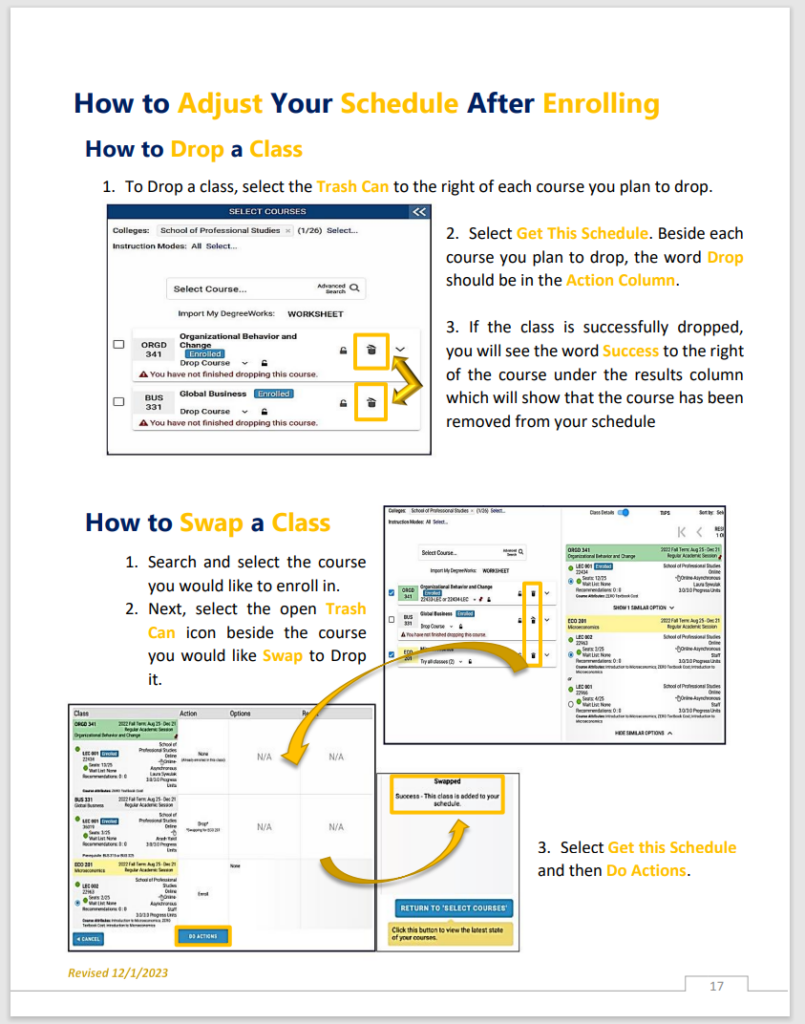
After courses have been added to a student’s schedule, they may be dropped or swapped for a different course within a term. Prior to dropping or swapping a course, all students should consult the Academic Calendar to view drop, refund, and withdrawal period deadlines.
- Dropping a course early: The course does not appear on your transcript and does not affect your GPA.
- Withdrawing from a course (W): The course remains on your transcript with a grade of W, which does not affect your GPA.
- Stopping attendance without withdrawing (WU): Results in a grade of WU, which does not affect your GPA.
Academic consequences vary based on timing and student history. Students are strongly encouraged to consult an academic advisor before withdrawing from a course.
Wait Listed Courses
Students may use the Wait List feature when a course is currently closed. However, not all courses offer a Wait List Option. Students placed on the Wait List will be assigned a position number and will be auto-enrolled based on their assigned number when a seat becomes available. Once a student is auto-enrolled, they will receive an email communication via their Medgar Evers email address.
Important: Once you have registered and paid for the semester or session, you are responsible for any fees and academic penalties incurred during registration. You must drop courses before the first day of classes or you will be liable for the tuition of the courses.
Enrollment (Registration) Status / Error Messages Explained
If an enrollment (registration) attempt — Enroll, Drop, or Swap — will result in one of three statuses:
Success — This indicates a successful transaction.
Message — This indicates a successful transaction, but there is additional information regarding the transaction or course. Click on the word “Message” to view detailed information. A requirement designation message may appear to denote that an area within the Pathways framework is being satisfied.
Errors — This indicates an unsuccessful enrollment transaction. You must click on the word “Error” to see the reason the enrollment transaction was unsuccessful. There are many error messages in the system; the most common errors are listed below. If you are looking for an error that does not appear on the list, remember to click on the word “Error” in the enrollment request screen for a detailed explanation.
Auditing Classes
Auditing classes allow students to attend and participate in a course without receiving academic credit or a grade. It’s a valuable option for those who want to explore a subject of interest, prepare for future coursework, or learn at a more relaxed pace.
Are you thinking about auditing a class? To get started, fill out the Course Audit Form.